Page 2 sur 3
Re: Hypex Filter Design et FusionAmp
Posté : 05 mars 2026, 20:00
par Kro
Signal detect / Auto power off
The FusionAmp features an automatic signal detect
function. When Signal detection is activated in HFD,
the FusionAmp scans for input signal and wakes up if
it detects and locks on to a signal. When no signal is
detected for the set amount of time, the FusionAmp
will switch to low power or standby mode (explained
below).
Note: when the FusionAmp is switched off by remote
control, Signal detect will switch it back on when a
AES
S/PDIF
Optical
AES
S/PDIF
source
select
signal is detected after the time-out period has
elapsed.
Power modes
# Standby
Meets 2013 ERP Lot 6 0.5W. In this mode the
FusionAmp scans for analogue input only. If a signal is
detected on any of the analogue inputs, the
FusionAmp automatically switches on.
# Low power
In addition to ultra-low power mode, which only scans
for analogue input, this mode also scans the digital
inputs for signal. Multi-way models only.
In standby or low power mode, the FusionAmp can
also be woken up by pressing the select button for 3
seconds, via the optional Hypex Remote or by
connecting it to a PC via USB.. Power modes can be
configured in HFD.
Note: the FusionAmp cannot distinguish the various
analogue inputs when the input selection is forced. An
analogue signal detected on an input other than the
forced input will result in waking of the FusionAmp but
without sound. This does not apply to the digital
inputs.
Re: Hypex Filter Design et FusionAmp
Posté : 05 mars 2026, 21:31
par pvrx
La fonction "Auto detect" existe bien, mais il faut la cocher pour qu'elle fonctionne. Dans mon cas, elle est décochée.
Je poursuis mes investigations avec l'aide de Gemini, en attendant la réponse du support Hypex.
Le problème est identique sur les deux enceintes, ce qui incrimine le logiciel HFD ou le firmware des FA503.
En outre, le problème n'est pas limité au seul canal 1, il est identique sur les autres.
Avec des bizarreries : par exemple, si je parviens à réaliser une mesure sur le canal 2 filtré (médium), si je désactive les filtres pour refaire une mesure en large bande le canal devient muet.
J'espère qu'Hypex aura une solution, sinon je leur demanderai de m'aider à revenir à la configuration de l'année dernière...
Pascal
Re: Hypex Filter Design et FusionAmp
Posté : 05 mars 2026, 21:54
par Kro
Kro a écrit : ↑05 mars 2026, 19:59
Je cite le manuel :
Source select
Automatic source select automatically locks on to the
first available source. The input scanner scans in the
following order and cycles:
# One-way models:
XLR | RCA | High Level Input
# Multi-way models:
AES | S/PDIF | Optical | XLR | RCA
During the scan cycle the output will be muted (Preset
LED blinking). When no signal is detected on the active
input for 15 seconds the cycle will start over.
The source can also be selected manually. Configure
manual or automatic source selection in HFD.
Et ça ?
Re: Hypex Filter Design et FusionAmp
Posté : 06 mars 2026, 09:21
par Dagda
Alors de mon expérience et utilisation (j'ai des "vieux" FA503 qui ne sont pas FIR).
J'utilise le auto-detect (que j'ai appelé trigger) mais celui ci allume et éteint tout l'ampli avec un timing que tu règles.
Quand HFD est connecté, si tu fais des modifications sur le filtrage ou la correction, il faut téléverser le filtre. Par contre, le Mute des voies se fait en direct ... pourquoi ? Bonne question.
Mais, quand tu balances un filtre ou une correction, les voies se dé-mute d'office.
Par contre je n'ai jamais eu de mute automatique de la voie.
Mais comme le signal Cédric, est-ce que tu as la sélection de source automatique ? (moi non je ne rentre qu'en XLR).
Il y a aussi peut-être une merde sur le nouveau Firmware ... ?
D.
Re: Hypex Filter Design et FusionAmp
Posté : 06 mars 2026, 10:25
par pvrx
Je n'utilise pas la sélection automatique de source, l'input est forcée en Analog XLR.
J'attends la réponse de Hypex, mais je subodore qu'il y a un pb sur le firmware, ou plutôt sur la compatibilité entre le firmware et les FA503 que j'ai achetés il y a deux ans.
Re: Hypex Filter Design et FusionAmp
Posté : 07 mars 2026, 00:15
par Dagda
C'est vraiment une version FIR le FA503 ?
Re: Hypex Filter Design et FusionAmp
Posté : 07 mars 2026, 09:34
par pvrx
Dagda a écrit : ↑07 mars 2026, 00:15
C'est vraiment une version FIR le FA503 ?
J'ai (un peu) avancé.
Les modèles
récents de FA503 ont la capacité FIR. Ceux que j'ai achetés voici deux ans ne l'avaient pas.
Croyant bien faire, j'ai commis l'erreur d'upgrader leur firmware à la dernière version, ce qui explique mes plantages.
J'aurais dû lire attentivement les release notes d'Hypex, où l'on peut lire :
"Please notice that only firmware v5.x+ has FIR capability, due to a hardware change"
Je suis donc en train de me battre avec les versions de HFD et de firmware pour revenir en arrière. Manque de bol, la page de téléchargement des "previous versions" sur le site Hypex est cassée (Support/Downloads/Previous versions/). Va falloir attendre qu'elle soit réparée...
Pascal
Re: Hypex Filter Design et FusionAmp
Posté : 07 mars 2026, 16:05
par Dagda
https://www.hypex.nl/products/amplifier ... namp-fa503
Ceux présents ici dans Download sont obligatoirement avec FIR ?
Sinon j'ai toujours un installer pour la version 4.9.7 si jamais ...
Re: Hypex Filter Design et FusionAmp
Posté : 07 mars 2026, 17:45
par pvrx
Dans la page FA503, onglet downloads, HFD v5 concerne les amplis récents, dont les firmwares sont aussi en v5.XX. Ils sont dotés des fonctionnalités FIR.
Pour les versions antérieures de ce matériel (dont la mienne, et la tienne aussi), la version du firmware est indiquée sur la fenêtre de démarrage de HFD. Pour voir la version de HFD, il faut cliquer sur "about" dans cette même fenêtre. Ces versions ne sont pas FIR.
Pour récupérer les versions antérieures, dont v4.97, il faut se rendre sur le menu "Support" du site, onglet "downloads (actuellement en carafe), et chercher dans "previous versions".
Mais si tu peux m'envoyer en zip le bundle v4.97, ça pourrait me faire gagner du temps, merci d'avance...
Je t'envoie un MP.
Pascal
Re: Hypex Filter Design et FusionAmp
Posté : 09 mars 2026, 14:44
par pvrx
Bonjour Dylan,
Je t'ai envoyé un MP.
Pascal
Re: Hypex Filter Design et FusionAmp
Posté : 09 mars 2026, 15:24
par Dagda
Oui je l'ai bien reçu et j'y ai répondu

Le mail que tu m'as donné ne fonctionne pas.
D.
Re: Hypex Filter Design et FusionAmp
Posté : 12 mars 2026, 10:02
par Dagda
Je te mettrais le logiciel sur mon FTP ce soir
Re: Hypex Filter Design et FusionAmp
Posté : 14 mars 2026, 00:56
par pvrx
Bonsoir,
Du nouveau de chez Hypex.
Ils ont vérifié à partir des numéros de série de mes modules qu'ils étaient bien FIR capables, que je devais garder le firmware 5.82 et installer la version v5.0 de HFD, dont ils m'ont transmis un lien de téléchargement.
J'ai donc fait ça, et j'ai commencé à jouer avec. Ca a l'air de fonctionner, pas de bug pour l'instant, à suivre, donc.
Je vais faire mes premiers essais d'égalisation, et j'ai déjà des questions.
Les fonctions d'EQ de REW permettent de calculer des filtres, dont en principe il devrait suffire de recopier les paramètres dans HFD.
Est-ce que certains d'entre vous ont déjà fait cette expérience, et quels sont les problèmes rencontrés ?
Je joins un petit pdf qui rend compte de problèmes apparemment identifiés, mais je ne vois pas encore vraiment comment les prendre en compte de façon pratique.
Si vous avez de l'expérience en la matière, ça m'intéresse !
Pascal
Re: Hypex Filter Design et FusionAmp
Posté : 14 mars 2026, 01:25
par Dagda
Cool, content que ça s'arrange !
Tu peux avoir des petites différences sur le filtrage avec HFD et suivant ce que tu as simuler sur Vituix par exemple. Il faut bien configurer Vituix pour lui dire que tu filtres avec un Hypex FA (dans les options). Ainsi il utilisera les formules de Hypex et pas des génériques.
Après, ça va pas faire des différences de malade non plus une fois la mesure acoustique réalisée ...
Mais, est-ce bien de ce genre de chose dont tu parles ?
D.
Re: Hypex Filter Design et FusionAmp
Posté : 14 mars 2026, 12:45
par pvrx
Je ne sais pas tout ce qu'on peut faire avec VituixCad.
Si tu pouvais décrire le processus que tu évoques, façon pas à pas, ce serait super. Je ne sais pas si Vituix peut générer des EQ automatiquement, ce qui serait idéal, et s'il tient compte des remarques que j'ai notées dans mon pdf plus haut : limitation du nombre d'EQ, de leur gain, de leur Q...
Pascal
Re: Hypex Filter Design et FusionAmp
Posté : 14 mars 2026, 13:04
par Dagda
Dans VituixCAD tu n'as pas vraiment d'EQ automatique comme le fait REW. Tu as bien "l'optimizer" mais je ne le trouve pas super efficace ... Enfin, ça fait un moment que je ne m'en suis pas servi.
Sinon, dans les options, il faut choisir ton DSP
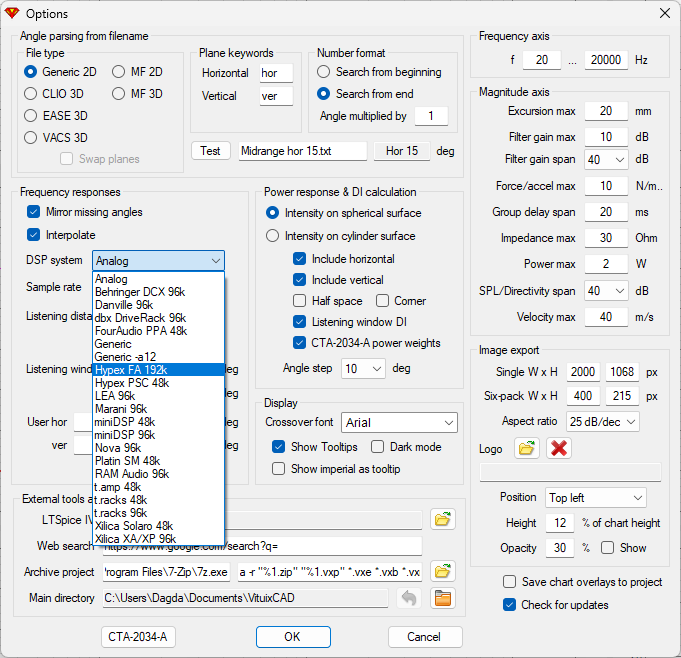
- image_2026-03-14_130213277.png (113.66 Kio) Vu 2044 fois
Comme ça, lorsque tu va insérer des filtres dans la zone de travail, il prendra en compte la manière travailler du DSP choisi.
Tu as la même chose dans l'outil EQ de REW
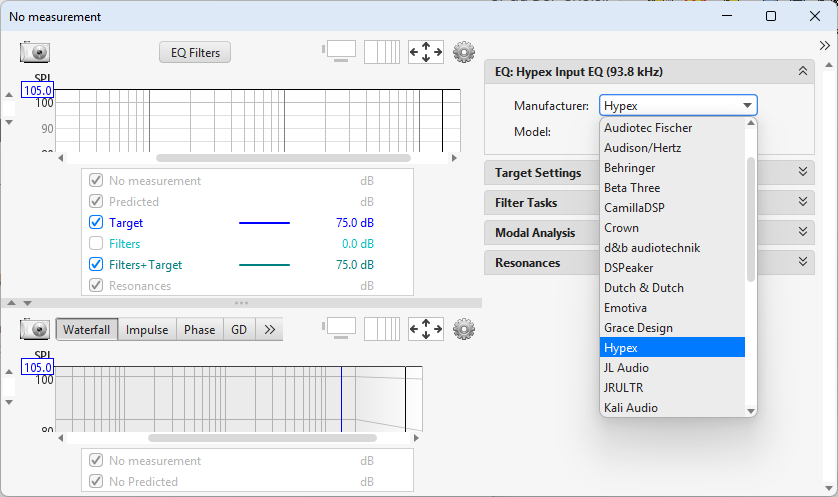
- image_2026-03-14_130413652.png (71.68 Kio) Vu 2044 fois
D.
Re: Hypex Filter Design et FusionAmp
Posté : 15 mars 2026, 12:59
par pvrx
Bonjour,
Et merci des retours !
Entretemps, j'ai un peu avancé.
Vituix peut effectivement calculer automatiquement des EQ.
Il faut pour cela dès le départ décider du nombre d'EQ à mettre en place.
Sur mon exemple ci-dessous, j'en ai mis 8.
Ensuite on ouvre l'optimizer.
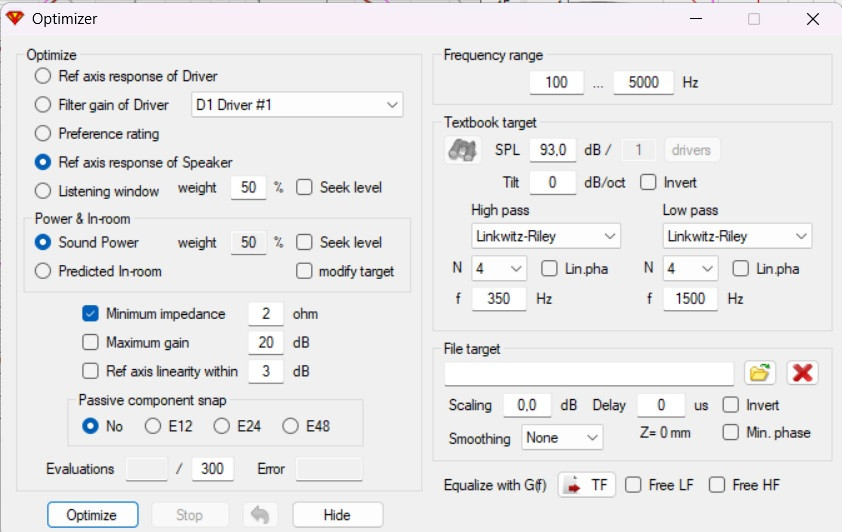
- Vituix Optimizer.jpg (113.82 Kio) Vu 1992 fois
On sélectionne ensuite l'ensemble des PEQ, et on lance l'optimizer. On voit alors tous les chiffres de tous les PEQ bouger dans tous les sens (ainsi que la réponse), et au bout de quelques secondes on obtient le résultat.
Pas trop mal, mais pas top. On ne peut notamment pas ajuster la précision d'égalisation attendue, comme dans REW. Dans mon exemple, je constate qu'on atteint la consigne à +/-3 bons dB, mais aussi qu'on a des PEQ à faible Q, ce que HFD devrait apprécier.
Pascal
Re: Hypex Filter Design et FusionAmp
Posté : 15 mars 2026, 13:32
par Dagda
J'ai quelques EQ à fort Q sans que ça ne pose de problème à HFD
Coll que tu trouves ton bonheur !
Re: Hypex Filter Design et FusionAmp
Posté : 15 mars 2026, 14:15
par Kro
L'optimizer de vituix est un peu plus complexe a utiliser et il faut un peu de méthode.
Pour de l'égalisation pure je préfère REW mais vituix te permet encore autre chose .
Après je suis un adepte de faire les choses en manuel.
En fir rew + rephase tu fais ton filtre en 5 min si tu as assez de taps.
Re: Hypex Filter Design et FusionAmp
Posté : 15 mars 2026, 15:29
par pvrx
Kro a écrit : ↑15 mars 2026, 14:15En fir rew + rephase tu fais ton filtre en 5 min si tu as assez de taps.
Pour les filtres de sortie, HFD dispose de 1500 taps au total par canal. Je ne sais pas si ça peut convenir pour un HP de médium ou d'aigu ?
